
Practice management for law firmsMuscat, Sultanate of OmanSince 2020
One file for every case, from the first consultation to the judgment
Ethbat is designed for law firms in Oman specifically. It keeps cases, hearings, documents, finance and HR in one file, and puts a copy of that file in the client's pocket and the employee's pocket.
Every sheet in its place
And the file is sealed
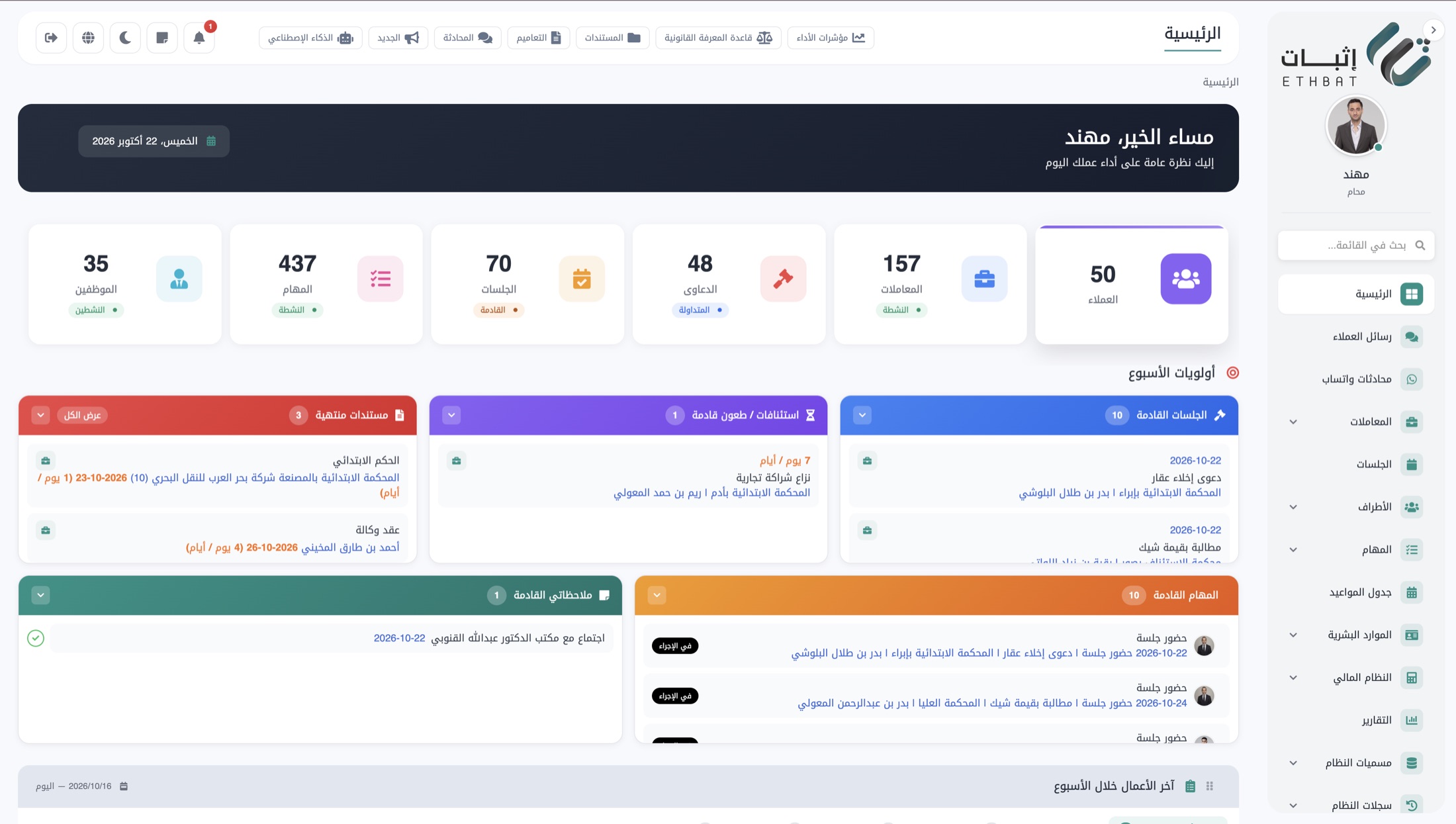
This is EthbatThe home screen a lawyer sees every morning: the firm's numbers, the week's priorities, upcoming hearings and tasks.
Firms running on Ethbat today
in the Sultanate of Oman since 2020, from solo practices to multi-branch law firms, and the Social Protection Fund.
 Social Protection Fund
 Al Hinai & Partners
 Basma Al Kiyumi
 Dr. Hilal Al Kharusi
 Rehab Amer
 Ahmed bin Musa Al Zadjali
 Ahmed bin Yousuf Al Zadjali
 Al Qalhati & Al Masrouri
 Al Jaradi & Qais Al Rashdi
 Ahmed Mahmoud Ahmed & Partner
 Al Maamari & Al Saidi
 Mohammed Al Hosni
 Mutasim Abdullah
 Dr. Mohammed Al Farsi & Co.
 Marwa Al Amri
 Dr. Talal Al Rasbi
 Al Kindi & Partners
 Saeed Al Sharji & Faisal Al Amri
 Al Badri, Nayef Al Qurri & Co.
We gave them every detail of what a law office needs, and they delivered a precise design and high quality. And they didn’t stop at the design: they keep developing and updating it.
Dr. Khalifa Al HinaiAl Hinai & Partners
Original post, in Arabic · Nov 2026
Why we built Ethbat
"Where is the case file right now?"One file
We started from this question, heard in more than one law firm. So we built Ethbat in the shape of a case file, because that is what a lawyer already knows: everything about the case in one place, seen by the employee from a phone in the courtroom, and by the client, who sees only what concerns them, without a call. We built it from Muscat, and we answer the phone ourselves.
The Ethbat teamMuscat, October 2026

Every case begins with a file
It opens with a consultation,
and closes with a judgment
Everything in between, in its place
A tour of Ethbat
Real screens from the demo environment, with the kind of data a firm works on every day. Scroll to move between them.
- 01
The day starts here
Clients, matters, claims, hearings and tasks at a glance, then the week's priorities in order: upcoming hearings, appeals and their deadlines, and documents about to expire.
Home - 02
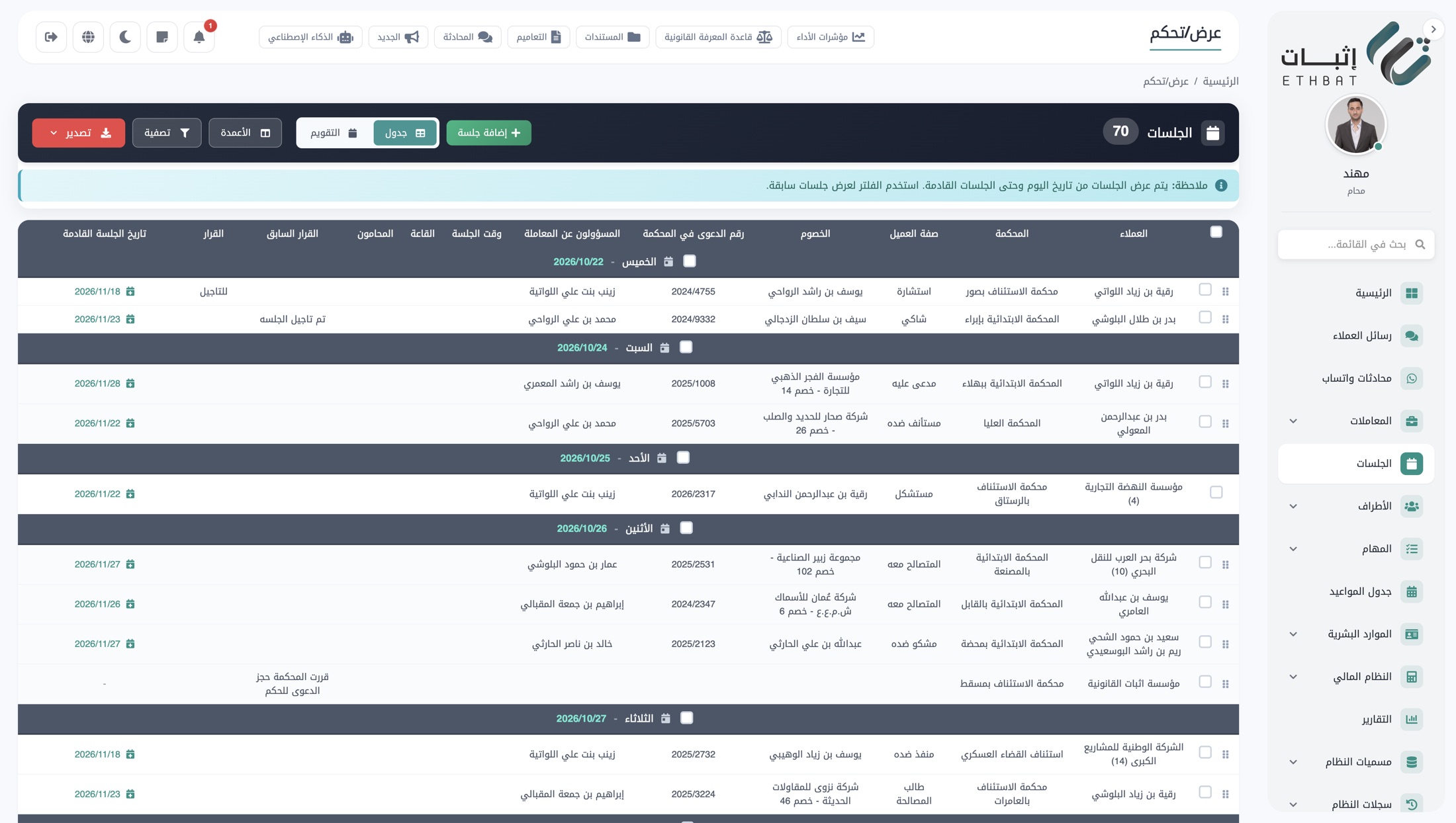
Every hearing in one table
Grouped by day, with court, claim number, opposing parties, the responsible lawyer, the next hearing date and the previous ruling. Filter by any column, export in one click, or switch to calendar view.
Hearings - 03
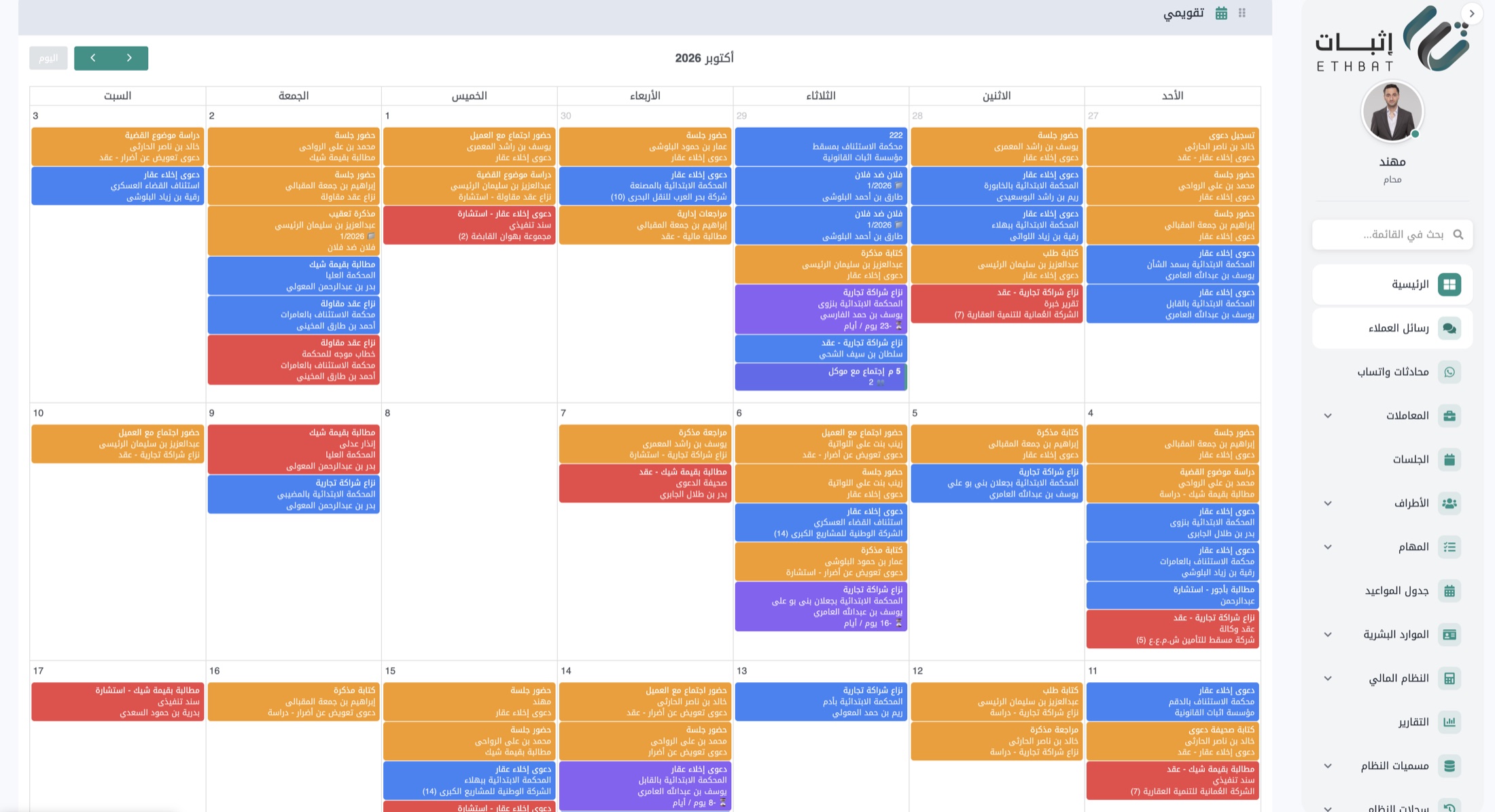
The whole month in front of the team
Hearings, appointments, memoranda and reviews on one calendar, colour-coded by type. Each lawyer sees what concerns them within their permissions, on the phone too.
Calendar - 04
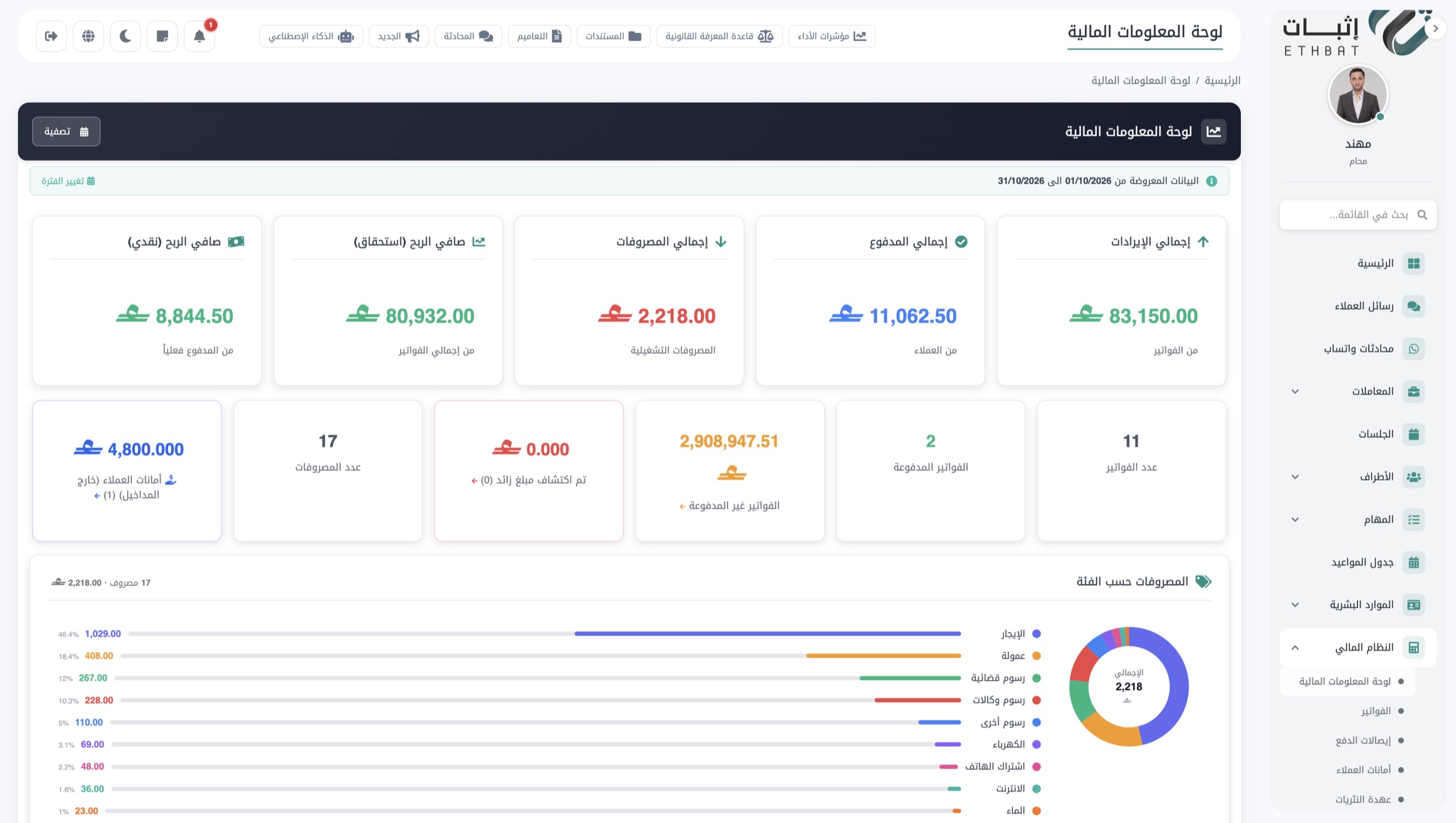
The firm's numbers without Excel
Revenue, payments, expenses and net profit on a cash and accrual basis, unpaid invoices, client trust balances and expenses by category, for any period you choose.
Financial dashboard
Eight modules. One system
Everything the firm needs, without leaving the file.
- 01
Cases and matters
A file per matter; appeal deadlines computed automatically.
- 02
Hearings
The whole firm's schedule, outcomes recorded from the courtroom.
- 03
Documents
Folders inside every file, alerts before powers of attorney expire.
- 04
Finance and invoicing
Invoices tied to the case, online payment through Thawani.
- 05
Human resources
Attendance and leave from the phone, a file per employee.
- 06
Tasks and permissions
Tasks linked to cases; roles define what each user sees.
- 07
Reports and dashboard
The firm's numbers in one view, reports with correct Arabic type.
- 08
Branches and audit log
Branches under central supervision, a log of every action.
Two copies of the file: one for the client, one for the employee
Client app and web portal
The firm creates the client's account. The client then signs in from their phone or at clients.ethbat.om and sees only what concerns them: their cases, upcoming and past hearings, documents, and invoices with the option to pay.
They receive a reminder before every hearing and a notice after every ruling. The practical result firms mention first: "what happened?" calls drop to almost zero.
Staff app
The working day from the phone: check in on arrival, today's hearings in order, the hearing outcome recorded from inside the court, assigned tasks, and leave requests with their approval status.
Every employee sees only what their permissions allow. The trainee doesn't see the firm's finances, and the accountant doesn't see defence memoranda.
Security and privacy terms
A firm's data is privileged. We write our commitments as articles because that is what we can be held to.
- Article 1
Complete isolation for every firm
Each firm has its own database, its own URL and its own identity. There is no shared database holding several firms, and no firm can reach another firm's data under any permission.
- Article 2
Permissions down to the field
Roles define every screen, every field and every action. What a permission does not allow is neither shown nor served by the backend, on the web or in the apps.
- Article 3
A log of every action
Every create, edit, delete and share is recorded with its actor, time and device, and stays available to the office manager without the possibility of editing it.
- Article 4
Time-limited sharing
Document share links are signed, expire automatically, and can be revoked at any time from inside the file.
- Article 5
App authentication
The mobile apps connect with short-lived JWT tokens over secured APIs, and a device's access is withdrawn the moment an account is disabled.
- Article 6
Backups and data ownership
Daily backups, and the data belongs to the firm. When a subscription ends it is handed over in full in readable formats, then deleted from our servers.
Connected to the services a firm actually relies on: WhatsApp for reminders, Thawani for online payment in Oman, email for reports, and push notifications for the apps. Exports to PDF, Excel and Word with correct Arabic typography.
Questions we hear often
- Is our firm's data isolated from other firms?
- Yes. Every firm runs on its own database and its own URL, with its own identity and logo, and no firm can access another firm's data. See Article 1 above.
- Does the client need an account to follow their case?
- The firm creates the client's account from the system. The client then signs in to the mobile app or the web portal to follow their cases, hearings, documents and payments.
- Does the system support more than one branch?
- Yes. It serves all of the firm's branches with a direct link between them, central supervision, and complete logs of every action.
- How is the client reminded of a hearing?
- Automatically, with an app notification, a WhatsApp message and an email before the hearing, then another notice with the outcome once the team updates it.
- How long does moving to Ethbat take?
- Within one day: we import ongoing cases from Excel or the previous system, train the team, and stay with you through the first week of use.
See Ethbat on your firm's data
Send us the number of lawyers and branches and the kind of cases you mostly handle, and we'll prepare a demo on data that looks like yours. We reply within one working day, usually the same day.